A content calendar that lives in git
Plan, render and publish branded social posts from a git repo.
Each post is a Markdown file. postline checks it against your house rules, renders an on-brand image card for it, and publishes it to LinkedIn, Bluesky, Mastodon or any webhook when its time comes.
npm install --global postline
One Markdown file in. A branded card and a scheduled post out.
---
at: 2026-11-03 08:30
topic: llm-output
card:
  layout: rows
  eyebrow: AI security
  headline:
    - LLM output is untrusted input,
    - not your application's output.
  items:
    - title: Rendered as HTML
      note: Cross-site scripting through the model
      chip: xss
    - title: Executed as a query
      chip: injection
    - title: Fetched as a URL
      chip: ssrf
  footer: Validate what comes out, not just what goes in.
---

What comes out of the model is untrusted input
to the rest of your system.
…
#AISecurity #AppSec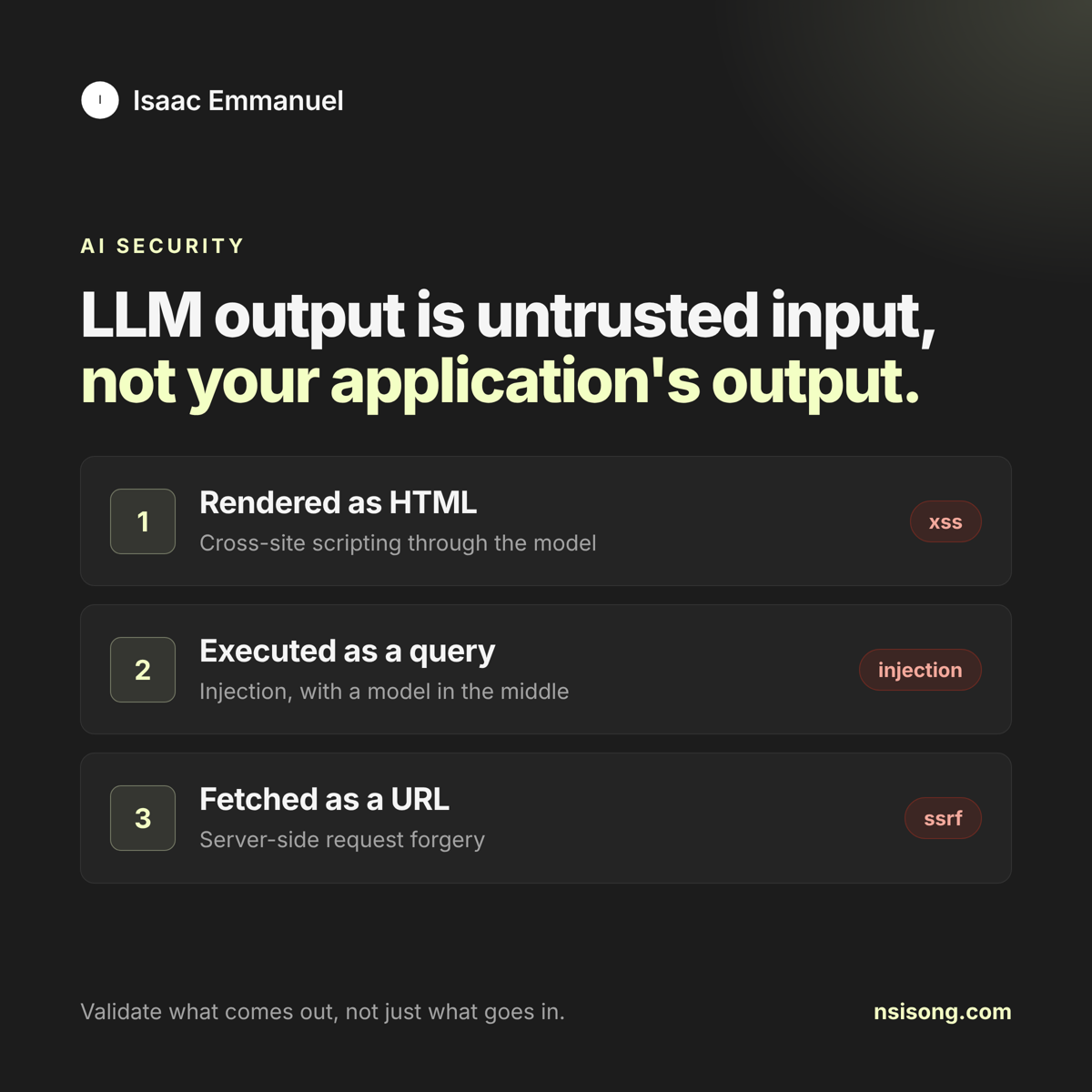
postline.config.yaml.What you get
-
Posts as files
Review copy in pull requests. Grep your history. Nothing is locked in a vendor.
-
Cards from your design system
Colours, font and logo live in one file. Point it at your design tokens, add your own CSS, or write your own layouts in HTML.
-
Rules that block bad posts
Hashtag limits, banned phrases, allowed link domains, emoji policy, per-network character limits and a check for broken text encoding.
-
Publishing that never double posts
Official APIs only. If a run dies mid-send or a network gives no clear answer, postline stops and asks instead of guessing.
-
Every graphic kept
A lossless, full-size copy of each card is saved on your computer with a gallery to browse them later.
Your week, at a glance
Drafts for every empty slot with postline plan. Lint them in CI. Then publish from GitHub Actions, your operating system's scheduler, or the built-in daemon on any always-on machine. A ledger records what went where.
$ postline lint
3 posts, 0 errors, 0 warnings

$ postline status --week 2026-11-03
week of 2026-11-03 (America/New_York)

Tue, Nov 3, 8:30 AM        2026-11-03-untrusted-output  linkedin:queued blog:queued
Thu, Nov 5, 8:30 AM        2026-11-05-least-privilege   linkedin:queued blog:queued

$ postline daemon --every 15
postline daemon started; checking every 15 minutes
Does every post look the same? Only if you want it to.
- Built-in layouts Rows, grid and statement, in your colours, font and logo. Zero setup.
- Your tokens and CSS Read the tokens file your design system already exports and restyle the built-in layouts.
- Your own layouts Drop HTML templates into a folder;
quote.htmlbecomeslayout: quote.
Where it publishes
- Company pages or members, via the Posts API. Hashtags stay clickable.
- Bluesky
- App password login. Links and hashtags become rich text, and retries can't post twice.
- Mastodon
- Any instance, with an idempotency key on every status.
- Webhook
- A signed JSON POST for Zapier, Make, n8n, Slack approvals or your own service.
- Files
- Markdown and the image into a folder, such as your static site's blog.
Start with one post.
postline init scaffolds a config, a sample post, a logo and a GitHub workflow.